
A Home Recording Studio for Kids and Teens
What I’d want parents to know after 17 years in music and voice over
Published Updated

One of the greatest gifts my parents ever gave me was taking my dreams seriously, even when they sounded a little crazy.
That didn’t mean buying everything I asked for. They helped me get the tools to start, then supported the next step as I grew. My first guitar and amp. My recording setup. Our original band room back in Moscow, Kansas, where I had a dedicated space to create and record whatever I wanted.
That freedom shaped my life in a huge way. I’ll always love and cherish what my folks gave me, and I’m eternally grateful for it. Having someone believe in what you want to do, and help you take that first step, stays with you.
Music is what started this whole journey for me. It eventually led me to stumble into voice over. I’ve now worked in music and voice over for 17 years, and I still think about what having those tools and that space meant to me. It’s a big part of why I believe a recording studio can be such a meaningful gift for the right kid.
I was always in that band room recording, pushing buttons, pulling wires, and figuring things out as I went. I never really learned the “proper way,” and I didn’t take classes to learn recording. When I couldn’t work something out, I went to YouTube.
If yours is always picking up a guitar, trying out character voices, or making up stories, give that interest somewhere to go. Help them get a recording, listen back together, and let them decide what they want to try next.
They might spend an afternoon making a ridiculous character. They might write a song. Over time, they can also learn to edit, finish a project, take feedback, and handle the business side of creative work. Those are skills they can keep using long after the first recording.
That’s what excites me about this. You’re giving them a place to begin, with equipment they can grow into. For a child who really takes to it, that same studio could eventually become part of how they earn a living.
Buy the studio once and keep building
I want parents to understand the thinking behind Vox Boy: the kit is a one-time purchase of the core recording hardware. You start with a professional microphone and an Apollo Solo interface, then keep developing your skills on that equipment.
Writing a better song doesn’t require a new microphone every year. Moving from music to voice over or learning to edit a podcast doesn’t mean starting your studio over. The idea is to give your kid a setup that can follow their interests as those interests become more serious.
Our design goal is up to ten years of use with proper care. That is a design target, not a ten-year warranty or guaranteed lifespan. Component wear, maintenance, and future computer and software compatibility affect how long a setup remains usable. Current system requirements and warranty details help you plan that purchase.
Buying the kit once also leaves room for ordinary upkeep, software changes, and optional coaching or additions later. The goal is long-term use of the same core equipment, with your child’s ability doing most of the growing.
At home, on the road, or tucked away
My dad was also crucial in helping me develop the original Vox Boy kits for my own use while traveling. We really enjoyed working on those together. I was able to book countless jobs on the road and on vacation that I wouldn’t have been able to take without the kit.
That same idea matters at home, too. Vox Boy can be their home studio and their travel studio. Record at the desk, bring it along on a trip, or pack the kit away in a closet when that desk is needed for homework or another project. The recording equipment doesn’t have to take over a room.
If your kid catches the recording bug, that closet may not get much use. There’s always another idea to try, a skill to improve, or a project to finish. And for a teen building a business, that same setup can be where they return to record the next paid job.
For younger kids, let the first win be making something
Give a younger kid a short story and let them play every character. Make the robot sound ridiculous. Record a song about the dog. Let them invent the sound of a spaceship using whatever is sitting on the table.
Then listen back. They can decide which take they like, where the story needs a pause, or whether the spaceship needs another sound. You handle the setup and help with the controls; they get to make the creative decisions.
I think there’s real value in taking a child’s idea seriously enough to help them finish it. The project can be small. It can be goofy. It still belongs to them.
Give them another reason to open the laptop
A recording session gives screen time a job: writing something, recording it, and making an edit they can hear. It creates another option when they might otherwise keep scrolling. Keep it alongside time outdoors, reading, and other interests, as the American Academy of Pediatrics recommends for family media routines.
Music, voice over, podcasts, and whatever comes next

Start with a song
If music is what gets them excited, start there. Record a riff, try a melody over it, and see what happens. They don’t have to know where it might lead. I certainly didn’t.
The microphone can record singing. An electric or suitable acoustic-electric guitar plugs into Apollo Solo’s instrument input; a guitar without a pickup can be recorded with the mic. Record a guitar part, then add vocals in compatible recording software. Universal Audio explains the connections. Your kid can explore songwriting with the same core setup they use for spoken audio.
Start with a voice
Write a 30-second script for an imaginary product, or a scene with a character your kid invents. Try the same line two ways. Listen for what changes. That’s an actual performance exercise you can do together, and it gives a voice over beginner something specific to work on.
Follow their curiosity into a podcast
If they can talk about a subject all afternoon, help them turn a few minutes of it into an episode. They can research, ask questions, and edit the conversation. PBS Student Reporting Labs’ On Our Minds is one example of teens producing thoughtful audio. For a family project, borrow StoryCorps’ interview idea and record a grandparent’s story to keep privately.
Those are just a few starting points. They might make sound effects for a video or record audio for a school project. Give them the tools and let their interests lead.
The business lessons start with a finished project
There’s a whole job around a recording. Someone has to understand the brief, organize the files, respond to notes, and deliver what was agreed. When money is involved, someone also has to know what the work includes and send an invoice.
You can introduce that with a practice project. Ask your teen to record a short announcement for an imaginary school event. Give them a deadline. Request one change. Have them deliver a clearly named file and write a simple invoice. You’re making the responsibilities of a real assignment concrete.
This is the kind of guided business practice used in Junior Achievement’s high school Company Program. Talking through time, costs, and saving for a goal also fits the Consumer Financial Protection Bureau’s youth financial framework. You can teach the basics before a single dollar changes hands.
I’ve seen it happen in my own family
For Christmas, I bought recording gear for my niece and helped her get started in voice over with an early prototype my dad had built. Just a few years later, in her early twenties, she was working full time from home with her kit and buying a house.
She did the work to build that career. Every path is different, but hers is one reason I believe so strongly in helping a young person get started. I got to pass along some of the same support my parents gave me, and she made something of her own with it.
Give them a head start they can actually use
Imagine your kid finishing high school with a portfolio, experience meeting deadlines, and the confidence to discuss a project with a client. They would have something practical to build on while deciding what comes next. That’s a pretty incredible head start.
Eventually, this can become the equipment they earn with. That could mean recording voice overs, editing someone else’s podcast, or recording guitar or vocals for another musician. Turning something they love doing into work someone will pay for is a pretty exciting possibility. A young creator who develops the skill and finds clients could use paid work to help cover training, a car, or moving into their first place. Some may build a side business; others may work toward a full-time creative career. I like the possibility of giving them more choice in how they make a living.
That takes practice, reliable delivery, and customers who need the work. The kit supplies the recording tools. Finding clients is part of the job. In voice over, for example, acting work can be short-term and irregular. For minors, parents should manage client contact, accounts, agreements, and payments, and check the rules that apply to the job, including any child-performer permits.
If voice over is the direction your teen wants to explore, our Voice Actor Resources can help you find performance coaching, technical help, and rate guidance. Take a look together before choosing training or building a business budget.
Let the ambition be theirs
For a younger child, keep the focus on enjoying the project. For a teen, ask what they want to get better at. Harvard’s guide to adolescent activities puts this well:
“Most important is that the goals are meaningful to the teen and not established by others.”
Help them take their own idea seriously. That gives you something worthwhile to work on together, whether it becomes a business or stays a creative part of their life.
Start with one recording you can finish
Learning by doing is a lot easier when you can get help as you go. YouTube tutorials and AI tools can help explain an unfamiliar setting or work through a recording problem. Try the suggestion, listen back, and see if it helped. That can save a lot of headaches and leave more time for the part that got them interested in the first place.
You can get help with the setup, too. The guides and optional remote setup service below give you a way to get things working and get on with creating. Recording should be fun. Let them enjoy the song, the story, or the experiment. There’s time to learn how to turn that passion into a revenue stream as their skills grow.
For the first session, I’d keep it short. Record a guitar riff, a chorus, or a few lines of a story. Try it twice and listen back together. Pick the version they like and save it. Leave them with something finished and an idea for next time. Here’s one way to explore a few different projects:
-
Week 1
An original character or voice over
A 30-second recording with two different deliveries
-
Week 2
A conversation with a family member
A short edited story to keep privately
-
Week 3
A song idea or sound effects scene
One small original piece
-
Week 4
A project your child chooses
A finished recording and a plan for the next one
A few things I would check before buying
What does a teen need to record at home?
Before you buy, I’d run through this list together:
- Recording hardware. A microphone captures the performance, an audio interface connects it to the computer, and headphones let them listen back. The VB1 Pro brings the core recording gear together in one case. Choose the microphone count and headphone option that fit your family.
- A compatible computer and recording software. The computer is separate. Check the requirements for the Apollo version you choose on the kit page, and choose recording software that works with that setup.
- A quiet place to record. Make room on a stable table, with access to power. Curtains, rugs, and soft furnishings can help with room reflections. The kit packs away afterward, but it doesn’t soundproof the space.
- Any instruments they want to use. A guitar and instrument cable are separate. They can record singing or a spoken story with the microphone, so an instrument isn’t required to begin.
- Time for the first setup. Register the gear and install the required software using our setup guides. If you want help getting it working, Vox Boy Ready Setup with George the Tech is available separately.
See current kit pricing below, then check the configuration and any extras before you order. If you’re unsure what your child needs, ask us.
Is the interest already there?
Vox Boy is a substantial purchase for an ongoing creative interest. If your child is just curious, try recording with what you already own first. When they want to keep going, a dedicated setup has a clearer place in their life.
What else do we need?
A compatible computer is required and is not included. You also need recording software. Choose the right Apollo version and check the microphone and headphone configuration on the kit page. Younger children will need an adult to move and set up the case.
Will the living room work?
Start with a quiet space and soft furnishings, then experiment with microphone placement. The room still matters. The kit organizes the recording equipment; it doesn’t soundproof the room. The FAQ covers the practical details.
Can we get help setting it up?
Follow the setup guides, or choose the separately purchased Vox Boy Ready Setup with George the Tech for remote technical help. For voice over performance training, start with the Voice Actor Resources.
Do they need to post online?
No. A story saved for the family is a finished project. Decide together if anything should be shared, with permission from the people recorded.
Give their ideas somewhere to go
I’ll always be grateful to my folks for helping me get started. I’d love to see a kid open this case years from now and keep building on what they started, whether they’re recording for the joy of it or running a business from home. Giving them the tools, your encouragement, and the room to find out what they can do is a gift that can keep giving for years.
Buy the studio once. Keep building what comes next.
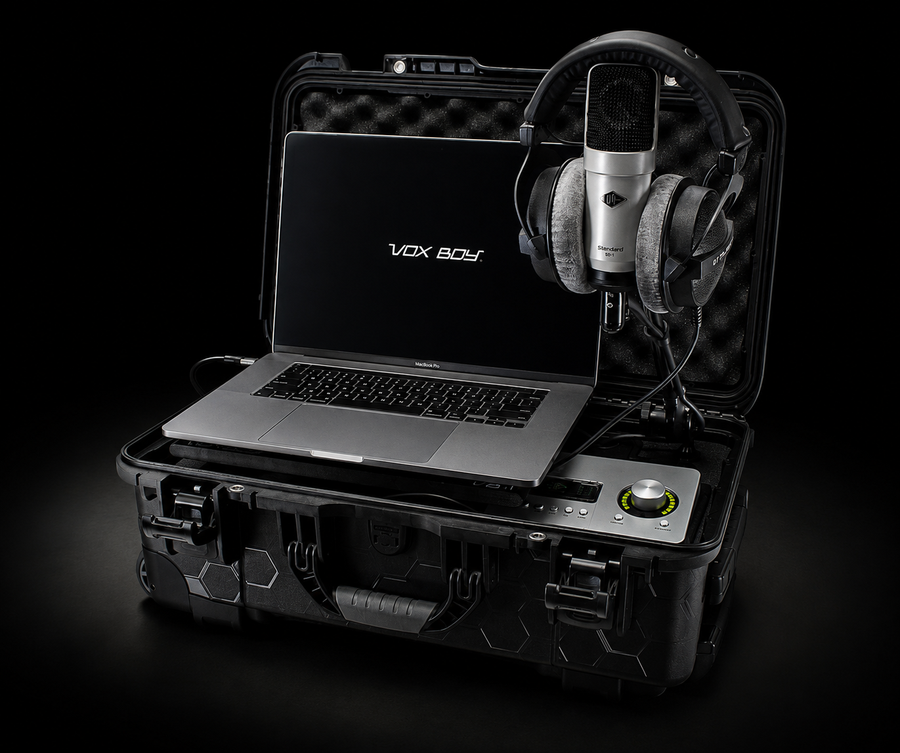
The VB1 Pro
Give their ideas somewhere to go.
A complete recording kit for the songs, voice overs, podcasts, and ideas they haven’t recorded yet.
From $2,799.00 USD
Choose your computer connection, microphone, and headphone configuration.
Explore the VB1 Pro Ask about a kit for your familyCompatible computer and recording software required. Computer not included.